
Seller profile · auto-entrepreneurs
Do you sell? Get paid by the rules, without a trade register
The Seller profile is a free option of your Personal account, for holders of the auto-entrepreneur card. Your customers pay you with a sale QR code or a payment link, and every sale is tracked in the app.
Is it for me?
Personal, Seller or Business: find the right account
It depends on what you do and the papers you have. The Seller profile sits between the everyday account and the business account.
Personal account
- For whom
- Your everyday money: family, friends, purchases.
- What you provide
- Your ID document.
- Receiving money
- From individuals: up to 100,000 DZD per month, from 10 different people at most.
- How you get paid
- Centeem transfer, payment request, My QR.
- Fee
- None on transfers between Centeem accounts.
Seller profile
- For whom
- You sell or provide a service on your own: online shop, crafts, lessons, home hairdressing…
- What you provide
- Your auto-entrepreneur card, in addition to your ID.
- Receiving money
- Sales: up to 400,000 DZD per month, with no limit on the number of customers.
- How you get paid
- 3 printable sale QR codes and shareable payment links.
- Fee
- 1% per sale, decreasing. Half price for the first 90 days.
Business account
- For whom
- Shop, company, store with employees.
- What you provide
- Trade register.
- Receiving money
- Within Business limits, up to 9,500,000 DZD per month at level 3.
- How you get paid
- Collect at each sale (QR, contactless, offline), links, employees.
- Fee
- 1% per payment collected, decreasing.
For which activities?
Made for people who sell on their own
Online selling
Selling on Instagram, Facebook or WhatsApp: send a payment link with the order amount.
Payment link
Markets, fairs and stalls
Print your sale QR code and put it on the stall: every customer scans and pays.
Sale QR code
Lessons and training
Private lessons, tutoring, coaching: one link per student, or an open-amount QR code.
Link or QR
Home services
Hairdressing, beauty, small repairs: the customer pays on the spot by scanning your QR code.
Open-amount QR
Home cooking and baking
Cakes or dishes to order: a link when ordering, the QR code on delivery.
Link + QR
Crafts and design
Jewellery, sewing, decoration: the QR code on your fair table, a link for remote orders.
QR + link
Examples for illustration only: your activity must be on the list of activities open to the auto-entrepreneur status (ANAE).
Your customers pay you
Two ways to get paid, no card terminal
The sale QR code, at the counter or the stall
Create a QR code once, print it, and it works for all your customers. They scan it with Centeem and pay: you have nothing to type.
- Up to 3 sale QR codes (for example one per product or one per selling point)
- Fixed price, or an open amount the customer enters
- A ready-to-print poster, created by the app
The payment link, to sell remotely
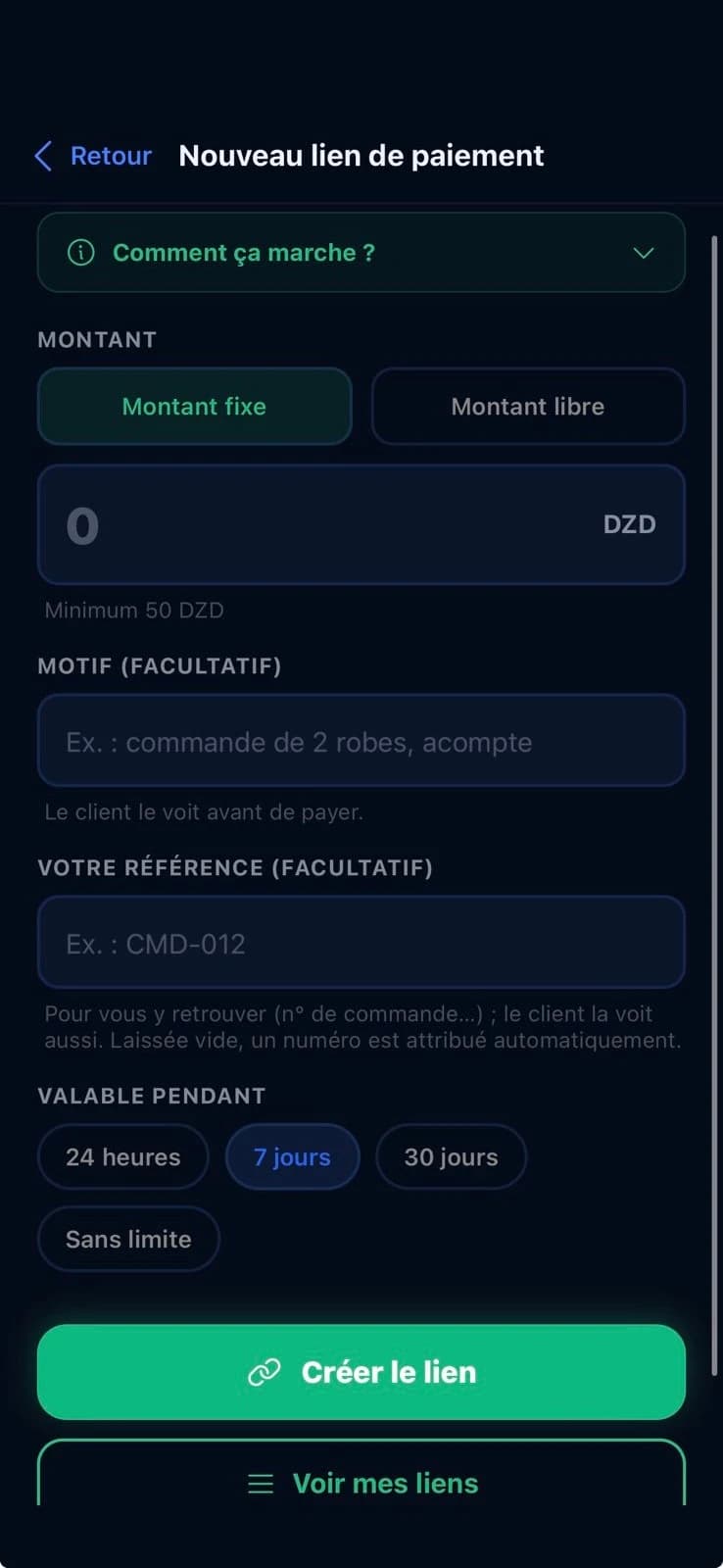
Selling on Instagram, Facebook or WhatsApp? Create a link with the amount and send it to your customer: they open it and pay in Centeem.
- Share by WhatsApp, Instagram, SMS or email
- Valid for 24 hours, 7 days, 30 days or with no expiry
- Fixed or open amount, with a reference to find the order
Your customers pay with the Centeem app, at no cost to them. You get a notification for every sale and the money is on your account right away.
Customer side
For your customer, it takes three steps
No bank card, no terminal: your customer pays with their phone, and you see the sale come in.
- 1
They scan or open the link
They scan your sale QR code with Centeem, or open the link received on WhatsApp or Instagram.
- 2
They confirm
They check the amount and confirm with their PIN or biometrics.
- 3
It's paid
They get a receipt, and you get a notification: the money is on your account.
Centeem · just now
Sale received · QR “Counter”
Fee: 7.50 DZD (welcome rate)
In the app
From sale to payment received
Real screenshots of the Centeem app.
Your sales QR codes
Create a payment link
The link is ready to share
The customer scans and pays
The sale lands on your account
All your operations in one place
Sales statement and details
Ready to use
Your poster and your statement, generated by the app
Two documents the app prepares for you: the poster for your counter and the monthly statement of your sales.
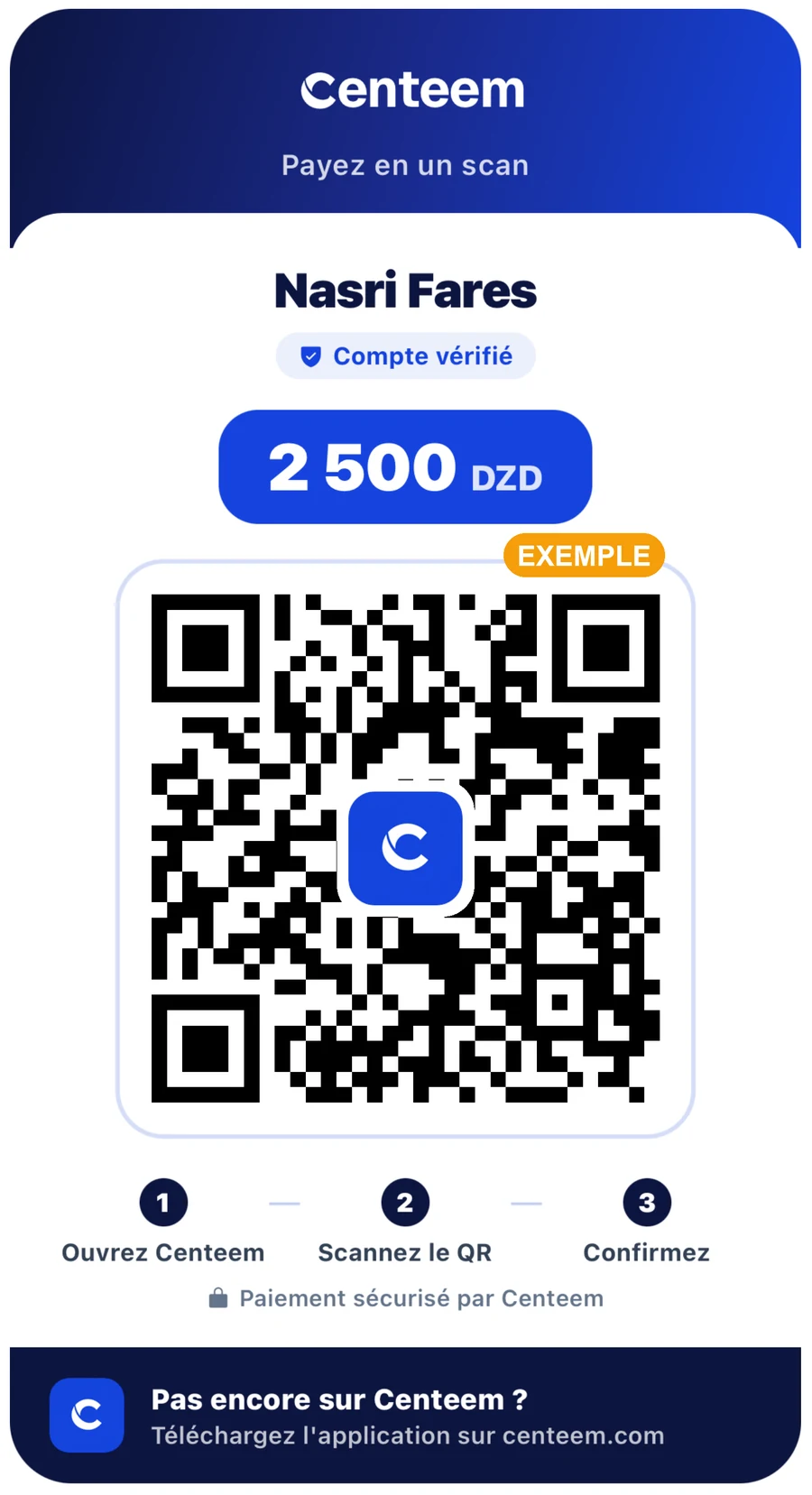
Your sales QR poster
Your name, the amount (or open amount) and the QR code, with the 3 steps for the customer. Print it on A4 and place it at your counter or stand.
View the sample poster (PDF)Sample: this poster's QR code opens the Seller page on centeem.com and triggers no payment.
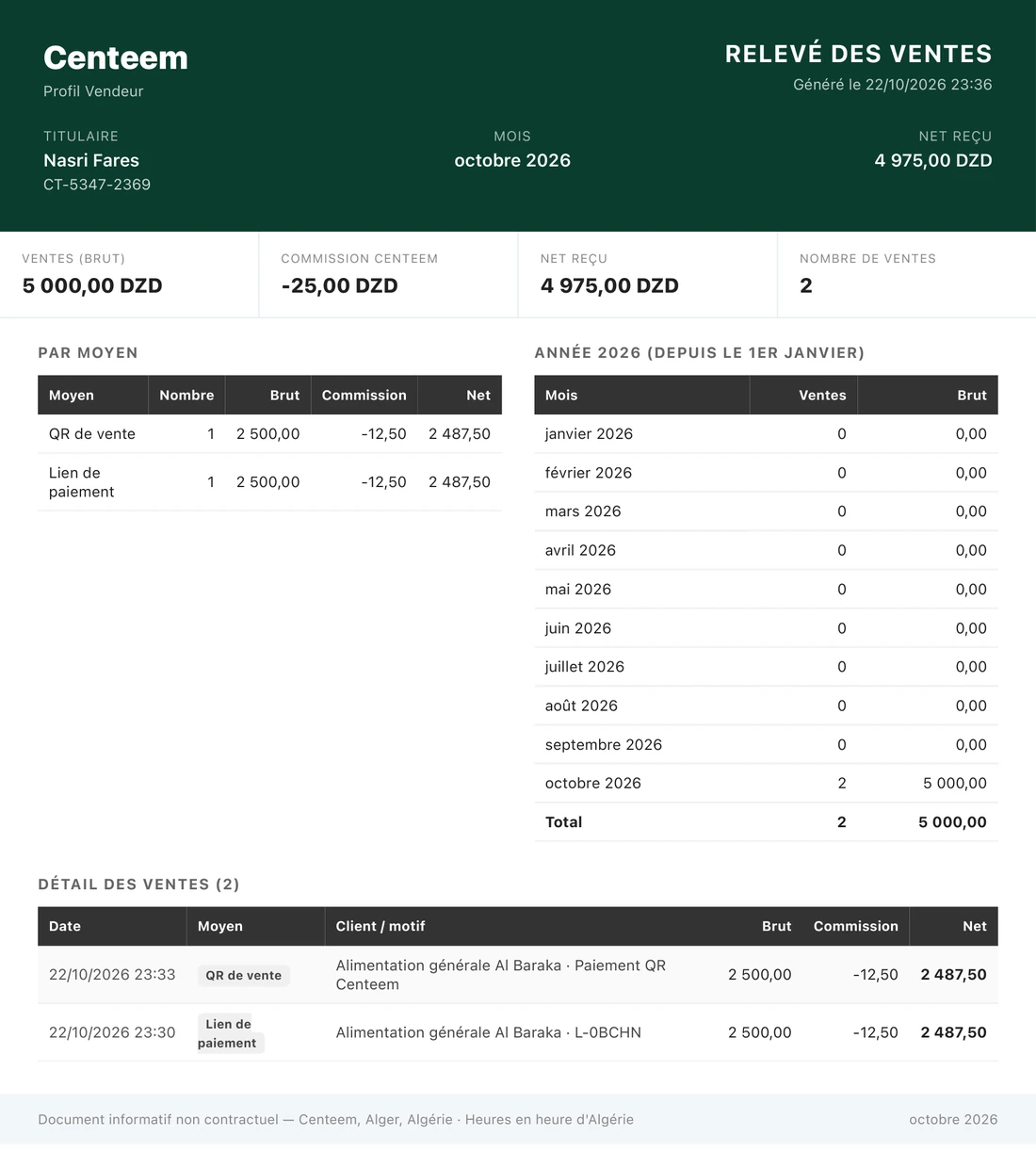
Your monthly sales statement
Gross sales, Centeem commission, net received and number of sales, broken down by method (QR or link), with the year-to-date total and every sale. As a PDF, or as a CSV sheet for your bookkeeping.
View the sample statement (PDF)What it costs
No subscription, a small fee per sale
Activation is free. A fee is taken on each sale received, the same as for the Business account. It goes down as the amount goes up.
| Sale | Fee | First 90 days |
|---|---|---|
| 1 000 DZD | 10 DZD | 5 DZD |
| 5 000 DZD | 50 DZD | 25 DZD |
| 20 000 DZD | 170 DZD | 85 DZD |
| 100 000 DZD | 730 DZD | 365 DZD |
- 1% up to 10,000 DZD, then 0.7%, 0.5% and 0.3% per bracket, with a maximum of 1,000 DZD per sale.
- Welcome rate: the fee is halved for 90 days after your profile is accepted.
- Your customer pays no fees.
- Withdrawals to BaridiMob or at an agent: same rates as the Personal account.
Where to start?
Your path, in two questions
Answer and we'll show you exactly what to do, whether or not you already have an account.
Do you already have a Centeem Personal account?
The Seller profile is added to a Personal account: no separate account is created.
In the app
The request, step by step
These are the screens you will see in the Centeem app, in order. Allow a few minutes, with your card at hand.
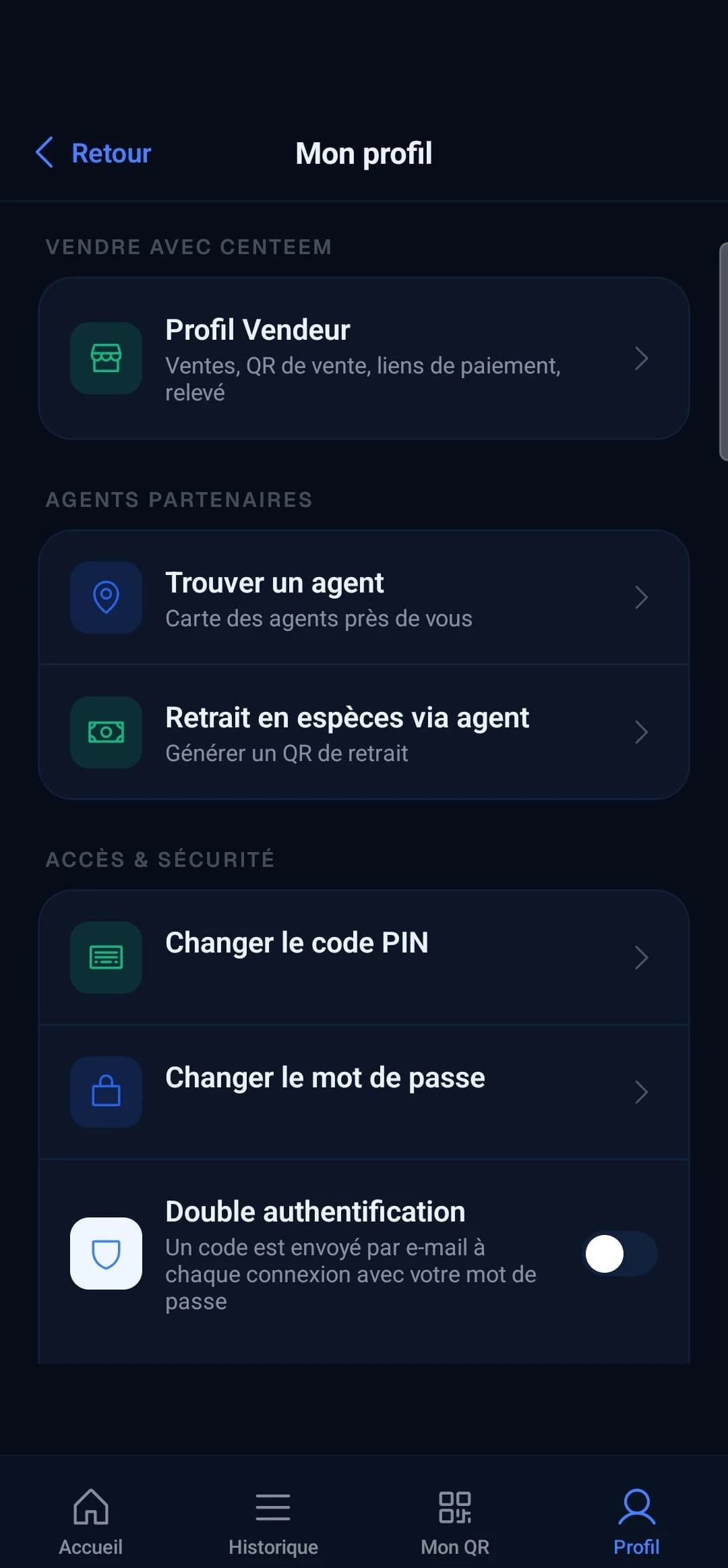
- Other ways in the app: the “Do you sell?” card in the My QR tab, and the card shown on the home screen when you get close to your receiving limit.
Track your sales, month by month
The “My sales” screen shows your sales for the month and the year, the fee and the net received. You can download a statement as PDF or CSV (Excel), and the app warns you when you reach 80% of your monthly cap.
Limits
Higher limits than the Personal account
Once the profile is accepted, your account moves to level 2 with Seller limits. On top of that: 400,000 DZD of sales per month, 5,000,000 DZD per year, and up to 200,000 DZD of withdrawals per day.
| Level | Per transaction | Per day | Per month | Max balance | What you must provide |
|---|---|---|---|---|---|
| Personal · level 2 | 200 000 DZD | 500 000 DZD | 1 000 000 DZD | 500 000 DZD | Proof of income |
| Seller profile | 400 000 DZD | 800 000 DZD | 2 000 000 DZD | 500 000 DZD | Auto-entrepreneur card |
See detailed limitsHide details
Maximum balances (100,000, 500,000 and 1,000,000 DZD) and each level's identification requirements (Annex I / Annex II) are set by Article 2 of Instruction 06-2025 of the Bank of Algeria. Per-transaction, daily and monthly limits are set by Centeem. Services are provided exclusively in Algerian dinars (Art. 31).
Is your business growing?
The auto-entrepreneur status is capped at 5,000,000 DZD of turnover per year. With a trade register, the Business account adds collecting at each sale (contactless, offline), employees and accounting.
FAQ
Your questions about the Seller profile
Step-by-step guides
Guides for this page


Open a Centeem account
Early access on Android and iPhone (TestFlight). Identity verification compliant with the Bank of Algeria's Instruction 06-2025.